AI Co-Collaboration and Problem Mapping. Your first team lab: set working agreements, divide research across your team, use AI to map your partner's problem landscape, and compile everything through GitHub.
"Every big change starts as one small, deliberate action."
First Ripple
Student Access
Token provided in class or on Canvas.
Professor Meirelles van Vliet
Fall 2026 · T/R 3:30-4:45 PM · KWR 310
SE 395-2: AI Tools for Social Impact
03
Week 5 · Thursday · AI Lab
AI Co-Collaboration and Problem Mapping
Your first team lab. Agree on how you work together, divide research, map your partner's problem landscape with AI, and compile everything through GitHub.
Time
75 minutes in class + homework
Tools
Claude, ChatGPT, or Perplexity + GitHub
Due
Tuesday, Oct 6, 11:59 PM
Part 0 · In Class
Team Working Agreement
Before you touch any AI tool or write any code, you need to agree on how your team works together. This is not a formality. Teams that skip this step spend the rest of the semester dealing with misaligned expectations, missed deadlines, and resentment. Teams that do this well avoid most of that.
Sit together. One person opens Granola on their laptop to record the conversation. Granola will transcribe everything automatically. You are going to have a 15-minute discussion using the questions below. After the conversation, you will use the transcript to draft your team's working agreement.
0 Record your team discussion
Open Granola on one team member's laptop and start a new meeting. State the date, your team name, and everyone present. Then work through the questions below. You do not need to answer every single one, but you need to cover the big ones. Let the conversation be natural. Granola will handle the transcription.
Guiding Questions
Communication
What tool will you use for team communication? (iMessage group, Discord, Slack, WhatsApp, etc.)
What is a reasonable response time? If someone messages at 10 PM, when should they expect a reply?
How will you handle it if someone goes silent for more than 24 hours?
Work expectations
When will you meet outside of class? How often?
What does "done" mean for your team? If someone says their section is done, what standard is that held to?
How will you divide work? By topic, by skill, by volunteering, by assignment?
What happens if someone's section is not done by the agreed deadline?
Decision-making
How will you make decisions when you disagree? Majority vote? Discussion until consensus? Someone has final say?
Who is the team's point of contact with your partner organization?
Who is responsible for sending the follow-up email after each partner meeting?
Quality and accountability
Will you review each other's work before submitting? How?
What is your policy on using AI? (Everyone uses it, but how much editing and verification is expected?)
If someone is struggling with their part, how should they ask for help? When is "too late" to ask?
The hard question
What will you do if a teammate is not pulling their weight? At what point do you escalate to the instructor?
Do not skip the recording. The transcript is your evidence. You will use it to generate your working agreement, and it goes in your repo. If a conflict arises later in the semester, this document is what we go back to.
A Generate your working agreement
End the Granola session. Copy the transcript from Granola (it generates one automatically when the meeting ends). Paste it into Claude or ChatGPT along with this prompt:
Working Agreement Prompt
Here is a transcript of our team's discussion about how we want to work together this semester. We are a team of [3 or 4] students working on a consulting project for [partner name].
Based on this conversation, draft a Team Working Agreement with clear, specific rules. Organize it into these sections:
Communication (tool, response times, what to do if someone goes dark)
Meetings (when, where, attendance expectations)
Work standards (what "done" means, deadlines, quality expectations)
Decision-making (how disagreements are resolved, who has final say on what)
Accountability (what happens when commitments are missed, when to escalate)
Use our actual words and decisions from the transcript. Do not add rules we did not discuss. If something was left unresolved, flag it as "UNRESOLVED: [topic]" so we can decide.
[Paste transcript here]
Review the generated agreement as a team. Edit anything that does not match what you actually agreed to. Resolve any items flagged as unresolved. Every team member should read the final version and confirm they agree.
Save this file as docs/team-working-agreement.md in your repo. This is the first file your team pushes to GitHub.
Part 1 · Setup
Connect to Your Team Repository
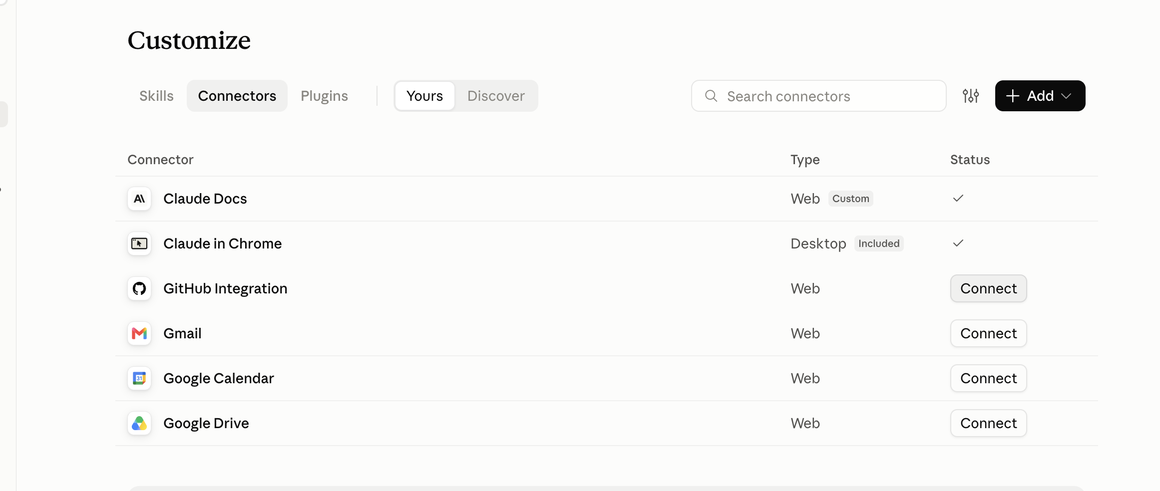
Your team has a GitHub repository already set up. Every team member needs to connect their AI tool to it. No terminal. No access tokens. Full step-by-step instructions with screenshots are in the GitHub Setup tab (right next to this one).
1 Connect your AI tool to GitHub
Before you start: If your team has not yet replied to the setup email I sent yesterday with your team name and GitHub usernames, do that first. I cannot add you as a collaborator until I have your username, and you cannot push until you are a collaborator. Check your email for the message with subject "SE 395 — Team [#] Setup and Next Steps."
The short version (the GitHub Setup tab has full details with screenshots):
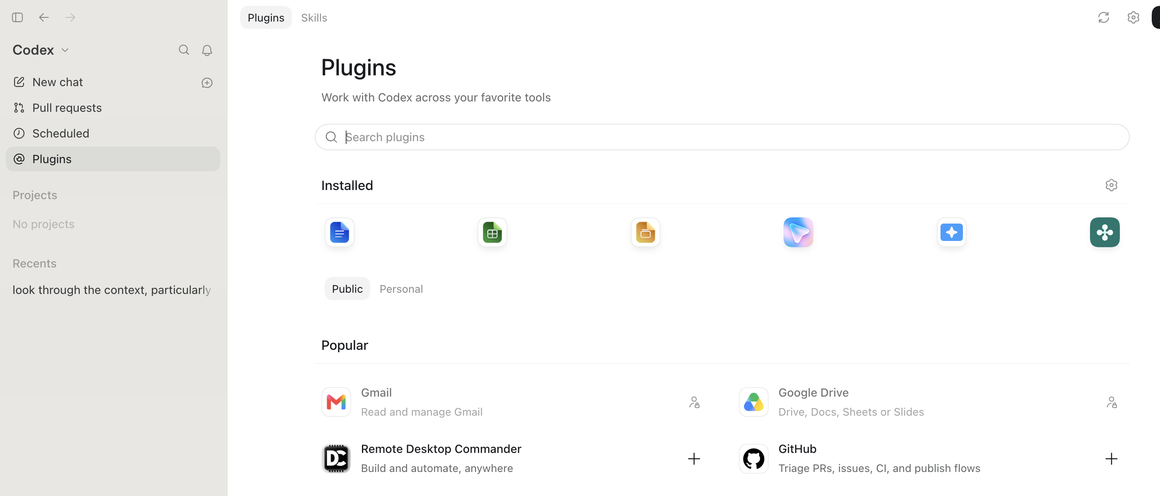
Connect GitHub in your AI tool's settings (Claude: Customize ▸ Connectors ▸ GitHub. ChatGPT: Plugins ▸ GitHub)
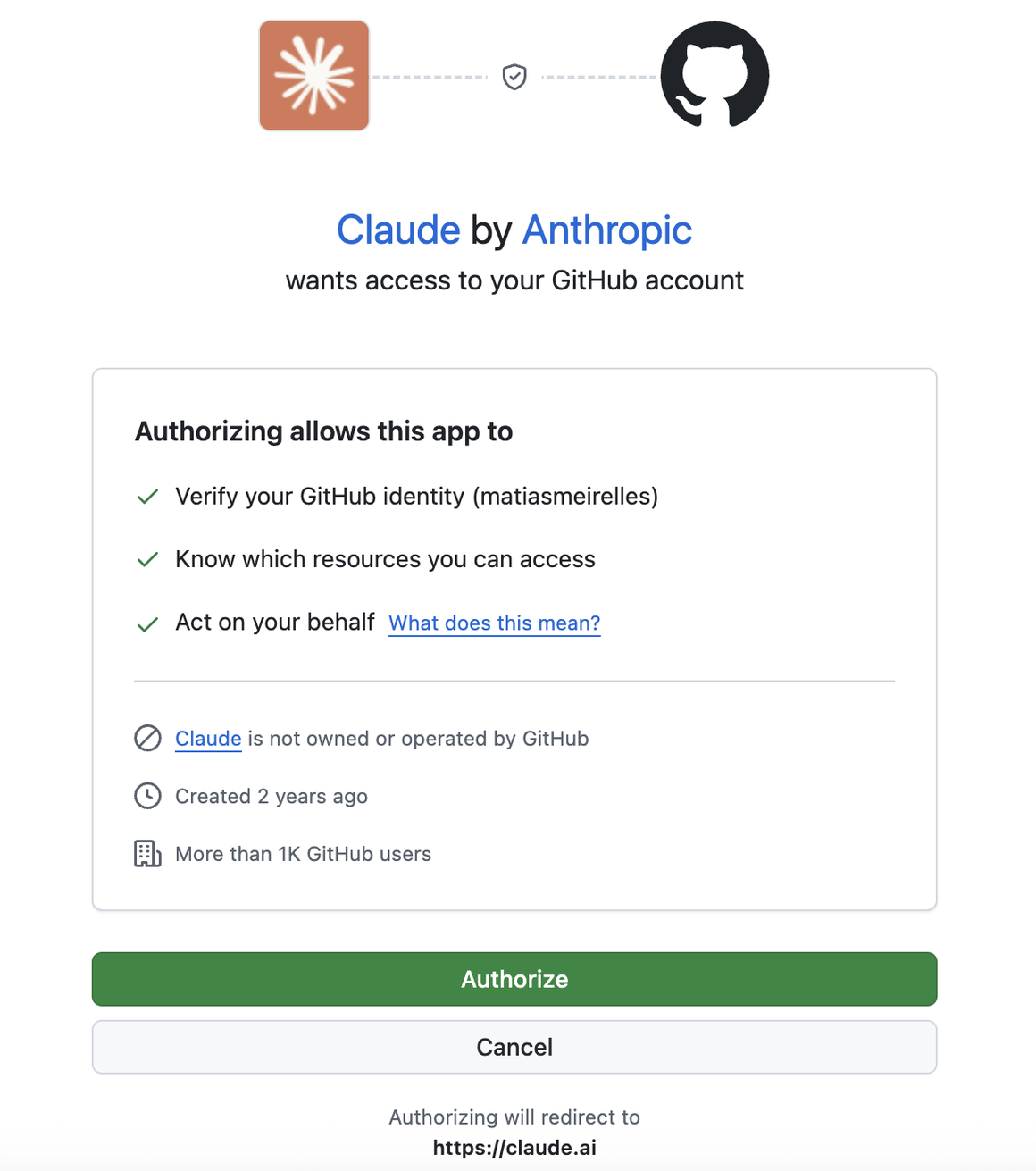
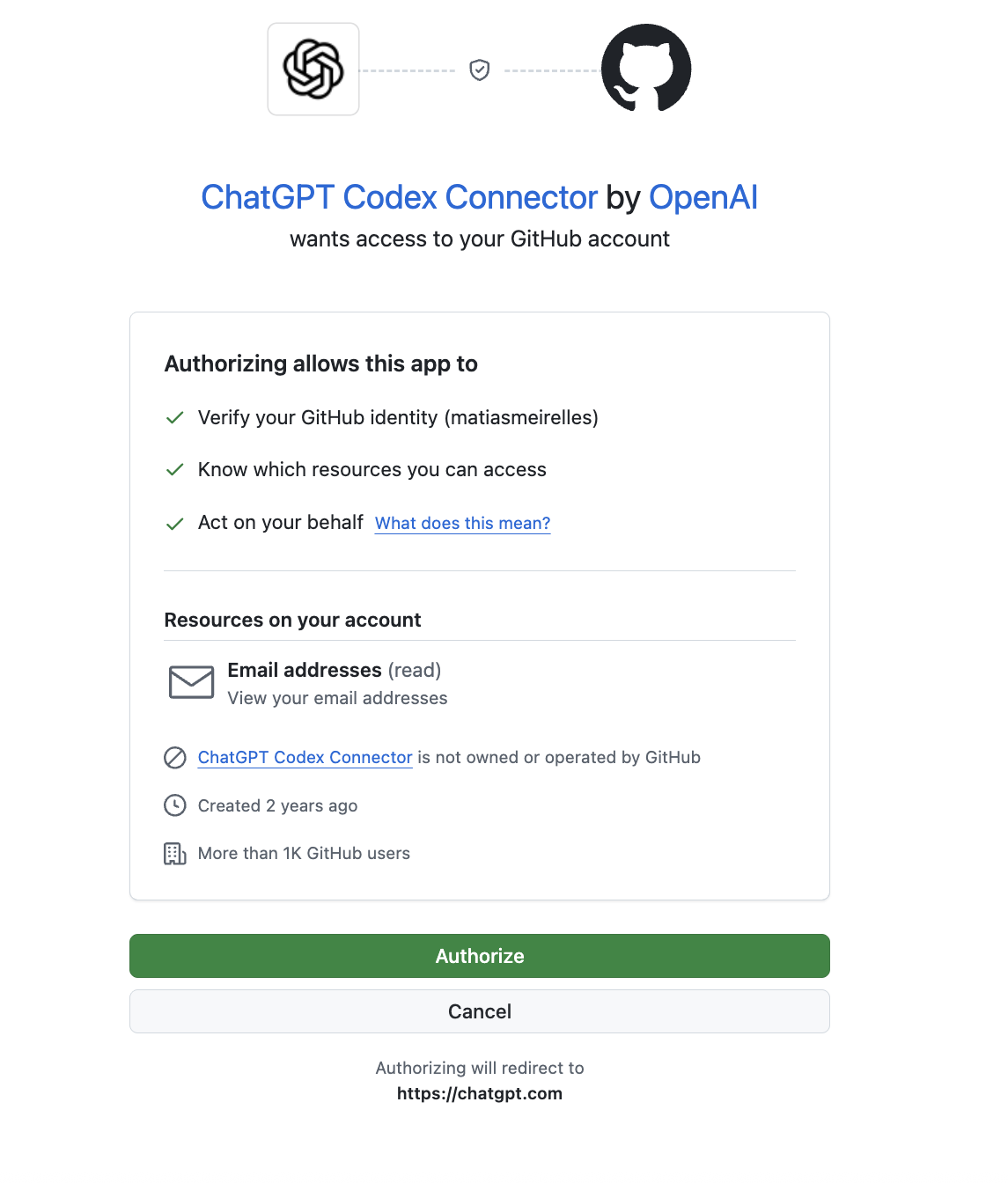
Approve the connection with one click in your browser
Select your team's repository when starting a new chat
Once connected, your AI tool can see all the files in the repository: discovery/, docs/, src/, and deliverables/. Your partner brief is in the README.md at the root of the repo.
If the repository does not appear: You have not accepted the GitHub invitation yet. Accept it first at github.com/notifications, then reload. See the troubleshooting section in the GitHub Setup tab for other common issues.
2 Test that you can push
Every team member should do this independently to confirm their access works:
Test Push Prompt
Create a test file called test-[my name].txt, commit it, and push it to GitHub. Then delete the test file, commit, and push again.
If the push succeeds, you are set up.
If someone cannot push: Do not skip this. Every team member must be able to push before you move on. Raise your hand and the instructor will help.
+ What your AI tool can do with your repo
Once your repo folder is open as a project, you can work entirely through conversation. Your AI tool can read your files, create new ones, and handle all git operations. For example:
"Read the partner brief and summarize what we know about their operations"
"Create my stakeholder map section as a markdown file in discovery/findings/"
"Pull the latest changes, then commit and push my work"
You do not need to use the terminal. Your AI tool reads, writes, commits, and pushes for you.
Part 2 · Planning
Divide the Problem Map
Your team is going to build a Problem Map for your community partner. This is a structured analysis of the problems and opportunities your partner faces, informed by what you learned during the partner visit, your own research, and AI-assisted exploration.
Each team member owns one section. You will work on your section individually using AI, push your work to GitHub, and then one person will compile everything into a single professional report.
This lab will also surface what you do not know yet. Pay attention to the gaps. Where is your understanding based on assumptions rather than evidence? What questions do you still need to validate through deeper conversation with your partner, observation in the field, or follow-up interviews with stakeholders? Those gaps become your discovery agenda for the weeks ahead.
If your partner brief in the repo is thin, do not wait for more information to be handed to you. Visit your partner's website, find them on LinkedIn, look at their social media, read any press coverage. Identify specific people in the organization you should be talking to. And if you have not yet scheduled a follow-up meeting or interview with your partner, the time is now. Proposals are due in two weeks. Every week you wait is a week of discovery you lose.
Teams of 4
Person A: Operations Map
How does the partner organization actually work day to day?
What are their core processes, workflows, and routines?
Where does information flow and where does it get stuck?
What tools and systems do they currently use?
Person B: Pain Points and Bottlenecks
Where does the partner spend too much time on manual or repetitive work?
What tasks fall through the cracks or get done inconsistently?
What frustrations did the partner express during their visit?
What workarounds do they use because the "right" solution does not exist?
Person C: Stakeholder Map
Who does the partner serve? Who are their beneficiaries, clients, or audience?
Who else do they interact with? (Funders, government, volunteers, other orgs)
What does each stakeholder group need from the partner?
Where are there tensions or trade-offs between stakeholder needs?
Person D: Opportunity Analysis
Based on the pain points and stakeholder needs, where could AI genuinely help?
Which opportunities are realistic for this organization's size and budget?
What are the risks of each opportunity? (Dependency, cost, data privacy, etc.)
Rank the top 3 opportunities by impact and feasibility
Teams of 3
Person A: Operations + Pain Points
Combines the Operations Map and Pain Points sections above
How the org works, where time is wasted, what is manual that could be improved
Person B: Stakeholder Map
Same as Person C above
Who the partner serves, interacts with, and what each group needs
Person C: Opportunity Analysis
Same as Person D above
Where AI could help, what is realistic, rank top 3
Decide who does what before you leave class. Write it down. Each person should know exactly what they are responsible for before they start working.
Part 3 · Individual Work
Build Your Section with AI
This is the core of the lab. Each team member works individually, using AI to research and write their assigned section. You are not just asking AI to generate text. You are using it as a research partner to build a thorough, evidence-based analysis of your partner's situation.
3 Research your section
Start by reviewing what you already know. Your repo's partner-brief/ folder has the partner visit transcript and key information. Read it. Then open your AI tool and start a conversation focused on your assigned section.
Starting Prompt (adapt for your section)
I am a university student working on a consulting project for [partner name], a [brief description]. Here is what I know about them from a class visit:
[Paste key details from the partner brief relevant to your section]
I am responsible for [your section: operations map / pain points / stakeholder map / opportunity analysis]. Help me build a thorough analysis by:
Identifying the key questions I should be answering in this section
Analyzing the information I already have from the partner visit
Flagging gaps where I need more information (things I should ask the partner next time)
Suggesting how organizations similar to this one typically handle [the focus of your section]
Base your analysis on what I have shared. Do not invent details about the partner. If you are drawing on general knowledge about similar organizations, say so.
Follow up. Push back. Ask the AI to go deeper on the most interesting findings. Challenge claims that feel generic. The conversation should be at least 8-10 exchanges, not a single prompt and copy-paste.
Follow-Up: Go Deeper
You mentioned [specific finding]. That feels generic. Can you give me a more specific analysis based on what I told you about [partner name]? What would this look like in practice for an organization of their size ([X people])? What would they actually need to do differently?
Follow-Up: Find the Gaps
Based on the information I have shared, what are the biggest unknowns? What questions should I ask [partner name] in our next meeting to fill in the gaps in this analysis? Be specific. Give me questions I can actually ask, not vague topics.
4 Write your section
Once you have a solid research conversation, write your section as a markdown file. Your section should be 400-600 words, well-structured, and grounded in what you actually know about the partner.
Each section should include:
A clear summary of your findings (what you know)
Evidence from the partner visit (reference specific things the partner said)
Analysis (what the findings mean, not just a list of facts)
Open questions (what you still need to find out)
Save your file with a clear name in the discovery/findings/ folder:
Write it yourself. You can use AI to help with research and to check your reasoning, but your section should be in your own words. If the instructor reads it and it sounds like ChatGPT wrote it, that is a problem. Read it out loud. If you would not say it that way in conversation, rewrite it.
Part 4 · Push
Push Your Work
5 Commit and push
When your section is written and saved in the right folder, push it to the team repo.
Tell your AI tool: "Pull the latest changes, then commit and push my section and my conversation log." It will handle the git commands.
Always pull before you push. If a teammate pushed changes before you, your push will fail unless you pull first. Tell your AI tool to pull first and it will handle this automatically.
Make sure you also push your AI conversation log. Export or copy your conversation and save it as:
discovery/findings/conversation-log-[yourname].md
Part 5 · Compile
Compile the Team Report
6 One person pulls, compiles, and pushes
Designate one team member as the compiler. This person:
Pulls the latest changes to get everyone's sections
Reads all sections and checks for consistency, gaps, and contradictions
Combines the individual sections into a single, professionally formatted team report
Adds an introduction that frames the problem map and a conclusion that identifies the top 3 priorities
Saves the final report as deliverables/report/lab3-problem-map.md
Commits and pushes the final report
Compilation Prompt
I am compiling a team report from four individual sections written by different team members. The report is a Problem Map for [partner name]. Here are the four sections:
[Paste all sections]
Help me compile this into a single, cohesive report. I need you to:
Write a brief introduction (2-3 paragraphs) that frames the problem map and explains the methodology
Integrate the four sections so they flow naturally. Resolve any contradictions or redundancies
Add transitions between sections
Write a conclusion that identifies the top 3 priorities based on the analysis
Flag any inconsistencies between sections that I should resolve with my teammates
Keep each person's analysis intact. Do not rewrite their work. Just connect it and add framing.
The compiler should review the AI's output carefully. Make sure the report still sounds like it was written by your team, not by an AI. Edit anything that feels generic or disconnected from your actual partner.
Tell your AI tool: "Commit the compiled report and push it to GitHub."
Part 6 · Submit
Individual Submission
Every team member submits individually on Canvas, even though this is a team lab. Upload a PDF or Word file (.docx) that contains the compiled team report. Every submission should be the same final report. You are submitting it individually so that each person is accountable for the team's work.
What to Submit on Canvas
The compiled team report (the same document for everyone on the team)
Your individual AI conversation log (unique to you)
Both files are required. The team report shows the final product. The conversation log shows your individual contribution and how you used AI. Without the conversation log, I cannot verify your work.
Rubric
What Strong Work Looks Like
Strong (full credit)
Weak (minimal credit)
Your team working agreement has specific, actionable rules drawn from your actual conversation
Your working agreement is generic boilerplate that could apply to any team
Your individual section is grounded in partner-specific details from the class visit
Your section is generic analysis that could apply to any organization
Your conversation log shows 8+ exchanges with follow-ups, pushback, and deepening questions
Your conversation log shows 2-3 prompts with copy-pasted outputs
The compiled report flows as one document with a clear introduction, connected sections, and priorities
The compiled report is four individual sections pasted together with no framing or integration
Open questions are specific and would be useful in your next partner meeting
Open questions are vague ("learn more about the organization")
All work is in the GitHub repo with clear commit messages
Work was done outside the repo or pushed without meaningful commit messages
Grading
How This Gets Graded
Individual section is thorough, specific, and grounded in partner details
30%
Compiled team report is cohesive with clear introduction, analysis, and priorities
25%
AI conversation log shows iterative, critical use of AI as a research partner
20%
Team working agreement is specific and grounded in recorded discussion
15%
GitHub usage: clear commits, proper file placement, all team members pushed
10%
Due: Tuesday, October 6 by 11:59 PM. Each team member uploads the compiled team report and their individual conversation log to Canvas.
Length: The compiled team report should be 4-6 pages, professionally formatted (PDF or .docx). Conversation logs can be any length.
On contribution: I will check the GitHub commit history. If someone's name does not appear in the commits, I will follow up. The working agreement and the commit log together tell me who did what. Make sure your contribution is visible.
Exemplary Submission
Sample Problem Map Report
This report uses O-Town Compost (not one of our actual partners) to demonstrate what a strong Lab 3 submission looks like. Use it as a reference for structure, depth, and the level of partner-specific detail expected.
This shows what a strong session log looks like when working with an AI agent (Claude or ChatGPT desktop app). Notice how the student directs the agent, follows up on findings, pushes back on generic analysis, and uses the agent to read partner files and create documents directly in the repo.
The commands you need for this lab. Bookmark this tab. You will use these commands every week for the rest of the semester.
The Basics
Daily Workflow
Every time you sit down to work, follow this sequence:
1. Pull latest changes
git pull origin main# Always do this first. Gets your teammates' latest work.
2. Do your work
# Write your files, save them in the right folders.
3. Stage your changes
git add discovery/findings/my-section.md# Or stage everything you changed:git add -A
4. Commit with a message
git commit -m "Add stakeholder map section - Kara"# Be specific. "Update" is not a good commit message.
5. Push
git push origin main
Common Problems
When Things Go Wrong
"Your branch is behind" or "rejected"
This means a teammate pushed before you. Fix it by pulling first:
git pull origin main# Then try pushing again:git push origin main
Merge conflict
This happens when two people edited the same file. Git will mark the conflict in the file with <<<<<<< markers. Open the file, decide which version to keep, remove the markers, then:
git add [the-conflicted-file]git commit -m "Resolve merge conflict in [filename]"git push origin main
To avoid conflicts: each person works in their own file. If everyone writes in different files, merge conflicts almost never happen.
"Not a git repository"
You are in the wrong folder. Navigate to your cloned repo:
cd ~/Documents/se395-team1-ideas-for-us
Check what is going on
# See what files have changedgit status# See recent commits (yours and teammates')git log --oneline -10
git
Setup Guide · About 10 Minutes · Once Ever
GitHub Setup
Connect your AI tool to your team's repository. No terminal. No access tokens. You will do this once and it works for the rest of the semester.
Two ways to work with GitHub. For this lab, you only need to connect your AI tool (Claude or ChatGPT) to GitHub. Your AI reads and writes files directly in the repository. That is all you need to create documents, push your work, and collaborate with your team. Later in the semester, when you need to edit files locally (PowerPoint decks, design files, etc.), you will also set up GitHub Desktop to get a copy of the files on your computer. This guide covers both. Do Part A first, then Part B right after. The whole thing takes about 10 minutes and you only do it once.
Part A · Required Now
Connect Your AI Tool to GitHub
This is the fastest path. One approval screen in your browser. No installs. Your AI tool reads, creates, and pushes files directly to your team's repository.
Step 1
Accept the GitHub Invitation
I invited you to your team's repository. The invitation is waiting until you click it. Nothing else works until you do this.
Check your email or GitHub notifications
Look for an email from GitHub with the subject "Invitation to collaborate" or go to:
https://github.com/notifications
Click Accept on the invitation for your team's repository.
Why this causes most of the confusion: Until you accept, GitHub treats the repository as if it does not exist. It is private, and you are not on the list yet. So when you try to find it later, it simply will not appear. Accept the invitation first.
A GitHub page opens in your browser asking you to authorize Claude. Read the permissions, then click the green Authorize button.
If you use ChatGPT / Codex
On chatgpt.com, open the sidebar and go to:
Plugins ▸ find GitHub under Popular ▸ click the + button
A GitHub page opens in your browser asking you to authorize the ChatGPT Codex Connector. Click the green Authorize button.
That is the entire sign-in. No token. No password typed into an app. If any guide tells you to create a Personal Access Token, open a terminal, or run brew install git, you are reading an old guide. Close it.
Step 3
Select Your Team's Repository and Start Working
Pick the class repository
Start a new chat. Your AI tool will let you pick which repository to work with:
Claude: In a new chat, choose the repository from the project picker.
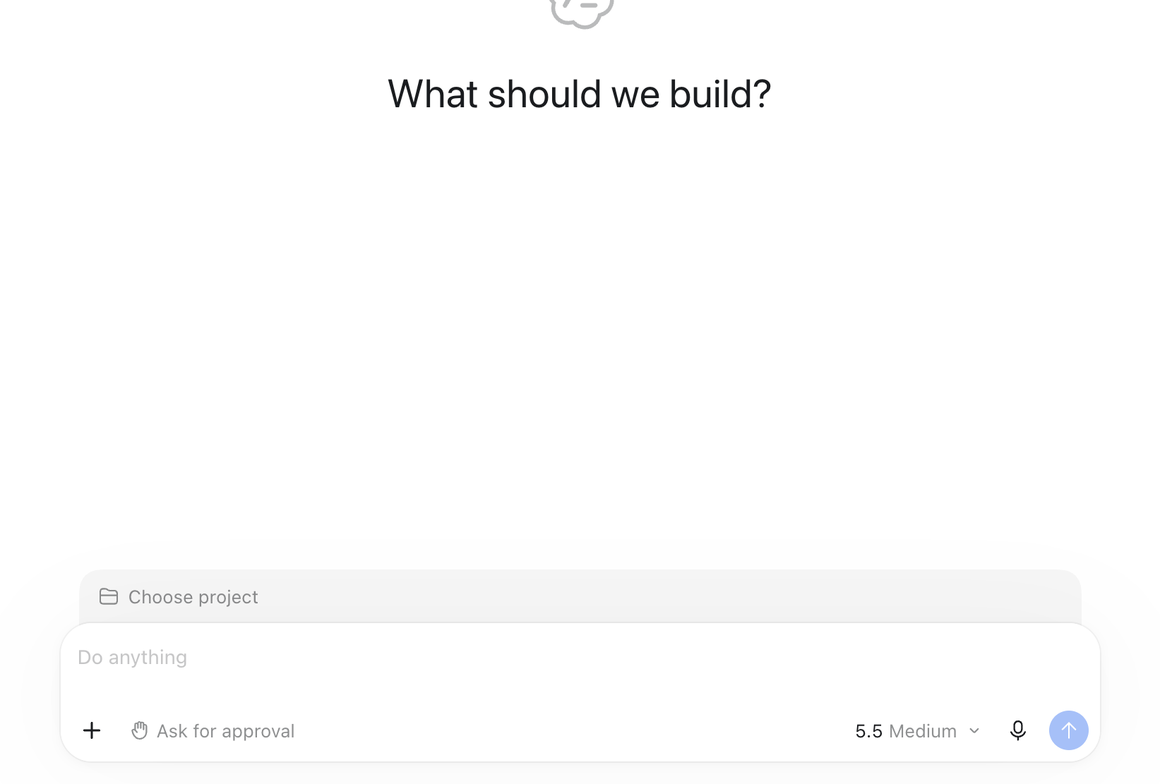
ChatGPT / Codex: Click Choose project above the message box and select your team's repository.
If the repository is not in the list, you have not accepted the invitation from Step 1. Go accept it, then reload.
Work, then ask it to save your changes
Do your work normally. When you want to send your work to the team, just ask in plain English:
Push Prompt
Commit my changes with the message "Add stakeholder map draft - Kara" and push to main.
Your AI tool handles the git commands. You never type a git command yourself.
Pull before you start working. At the beginning of every session, tell your AI tool: "Pull the latest changes from the repository." This gets your teammates' latest work before you start yours.
Downloading files for Canvas submission
When you need to submit a file to Canvas, you can download it directly from GitHub. Go to your repository on github.com, navigate to the file, and click the download button. You can also ask your AI tool: "Give me a download link for the compiled report."
Part B · Do This Now Too
GitHub Desktop for Local File Editing
Part A is enough for creating and pushing documents through your AI tool. But you will also need to work with files that require local editing: PowerPoint decks, design files, PDFs, or anything your AI tool cannot open directly. GitHub Desktop gives you a folder on your computer with all of your team's files. You edit them however you want, and GitHub Desktop sends your changes to the rest of the team. Set this up now while you are here so it is ready when you need it. It takes about five minutes.
Install GitHub Desktop
A free app. It brings its own copy of Git, so there is nothing else to install.
https://desktop.github.com
When it opens, click Sign in to GitHub.com. It opens a browser tab where you approve the connection with one click. Same approval as Part A. No token.
Clone the repository
In GitHub Desktop:
Click File ▸ Clone Repository
Your team's repository will appear in the list (because you accepted the invitation in Step 1)
Choose where to save it on your computer (for example, Documents/se395-team1-ideas-for-us)
Click Clone
You now have a folder on your machine with all of your team's files.
Never use the green "Download ZIP" button on GitHub. A ZIP has no connection back to GitHub, so you would have no way to send your changes to your team.
Your local workflow: Pull, work, push
1. Pull (get your teammates' latest work):
Click Fetch origin at the top of GitHub Desktop, then Pull origin if there are changes.
2. Work:
Edit files however you want:
Use your AI desktop app (Claude or ChatGPT) pointed at the cloned folder to research and write
Open a PowerPoint or Word document from the folder, edit it manually, and save
Both at the same time. The folder is just a folder on your computer.
3. Push (send your work to the team):
Open GitHub Desktop. It will show every file you changed. Write a short summary of what you did (for example, "Add stakeholder map draft - Kara"), click Commit to main, then click Push origin.
Work in your own files. If Kara is working on stakeholder-map-kara.md and Sean is working on pain-points-sean.md, you will never have a merge conflict. Conflicts only happen when two people edit the same file at the same time.
Troubleshooting
When Something Goes Wrong
"The repository isn't in the list"
You have not accepted the GitHub invitation. Go to github.com/notifications, accept it, then reload.
"Could not push" or push rejected
A teammate pushed before you. Pull the latest changes first (ask your AI tool or click Pull in GitHub Desktop), then try pushing again.
Merge conflict
Two people edited the same file. Your tool will highlight the conflict. Open the file, decide which version to keep, save it, then commit and push. To avoid this: each person works in their own file.
It connected to the wrong GitHub account
Disconnect GitHub from your AI tool (or sign out in GitHub Desktop), sign in to github.com with the correct account in your browser, then reconnect.
The authorize page never finished
It opened in a browser where you are not signed in to GitHub. Sign in to github.com in your default browser, then retry the connection.
It can see the repo but will not write to it
You were added with read-only access. Ask the instructor to give you write access.
Asking for help
Send a screenshot of the whole window and say which step you are on. "It doesn't work" cannot be diagnosed. A screenshot usually can, in seconds.